RoadReady Ohio
- 4.2
- Rating
- 10.00K
- Installs
- Free
- Price

 Analysis by App-foxy
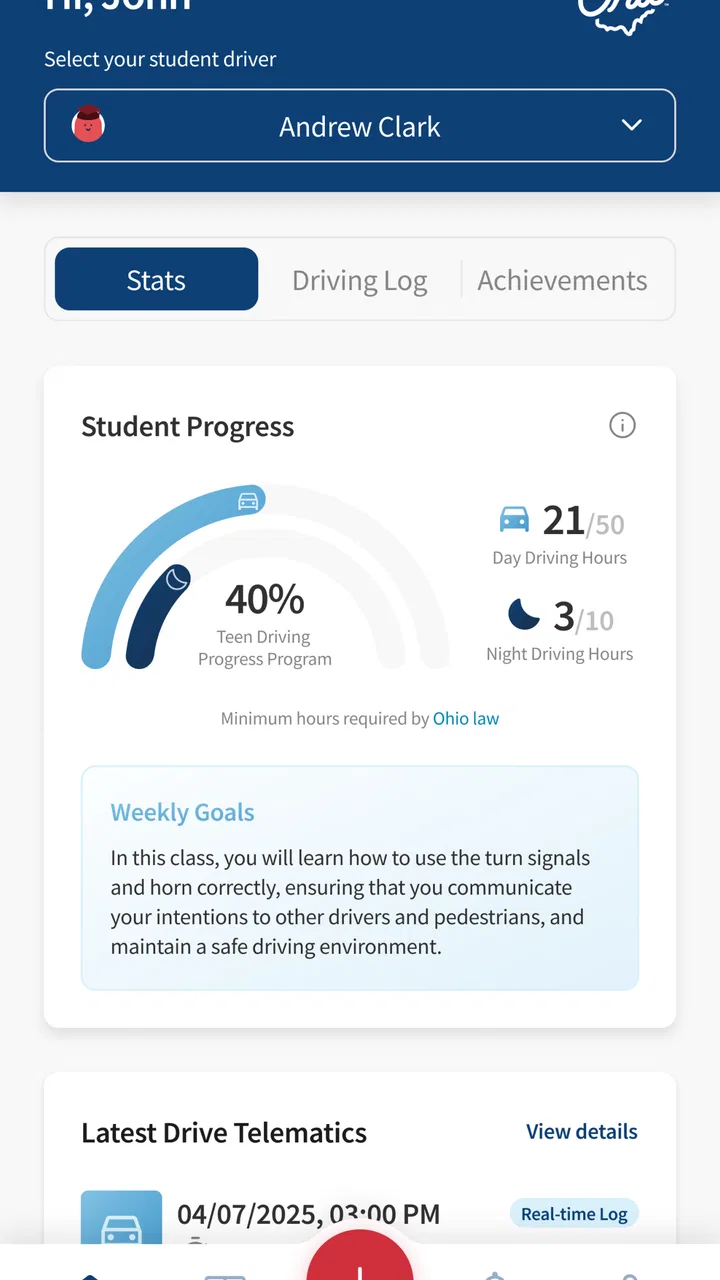
Learning to drive is not only about getting enough practice behind the wheel. It is also about remembering what happened, showing steady progress, and making sure practice covers more than the same familiar trip around the neighborhood. RoadReady Ohio is a free Auto & Vehicles app from Safe Roads Alliance, Inc. designed for the learner’s permit stage, and I found its most useful role to be simple: it gives teen drivers and their supervising adults a place to keep driving practice organized.
That narrow purpose is important. This is not a replacement for an instructor, a driving manual, or careful supervision. It is a practice log for Ohio learners, and that makes it most valuable when the driver and adult already have a plan but need an easier way to keep track of it. In my view, the app works best as a shared record that turns vague progress—“we have driven a lot lately”—into a more useful conversation about where, when, and under what conditions the learner has actually practiced.
How RoadReady Ohio feels to use in everyday practice
I judge RoadReady Ohio by whether its practice log can turn an ordinary drive into a useful next-step conversation, not by how much time it keeps a learner on a phone. I’d make the record a shared routine: the teen recalls what felt easy or difficult, and the supervising adult helps capture the session once the car is parked. That approach keeps the focus on learning, which leads naturally to the question of which families benefit most from that routine.
You May Also Like

 AccuWeather: Weather Radar
AccuWeather Review: A Quick, Clear Forecast for Everyday Decisions
For everyday plans, the best forecast is the one you can understand quickly. AccuWeather makes rain timing, radar, and local conditions easy to act on, with a few trade-offs.

 Hill Climb Racing
Why Hill Climb Racing Still Turns Crashes Into One More Run
A tiny car, a bumpy hill and one more upgrade: Hill Climb Racing keeps resurfacing because its simple chaos makes every near-miss feel personal.

 AliExpress - Shopping App
AliExpress Makes Global Shopping Feel Personal, but Shoppers Bear the Risk
AliExpress turns a global marketplace into a pocket-sized discovery engine. Its reach is useful, its shopping loop compelling, and its trade-offs easy to miss.

 Lords Mobile: Kingdom Wars
Lords Mobile Is a Kingdom-Building Routine, Not a Quick Match
A case-by-case verdict on the building, battles, device demands, and social commitments that make Lords Mobile rewarding for some players and exhausting for others.

 PDF Scanner app - TapScanner
TapScanner Makes Paperwork Easier to Capture, Check, and Share
TapScanner makes scanning with a phone feel less like a rescue operation and more like a dependable step in getting work done. Its capture tools are useful, though not flawless.

 Block Blast!
 Shows How Much a Puzzle Game Can Leave Out
A quiet grid game shows why puzzle players increasingly value instant clarity, repeatable skill and low-pressure play—and where the genre still needs to catch up.
More From Our News Desk
View All News


Readable navigation matters more than a crowded feature list
Because this app is meant to be used around real driving sessions, its navigation should be judged by how little attention it demands. A learner should not have to spend several minutes searching through menus after parking, and a parent should be able to understand the record without learning a complicated system. RoadReady Ohio’s focused purpose gives it an advantage over broad driving or vehicle apps: there is less reason for unrelated tools to compete for attention.
I would approach the app with a simple routine. Before a session, decide what kind of practice is planned. After parking, record the session while the details are still fresh. Then use the history as a prompt for the next outing rather than treating the log as paperwork that disappears into the background. This workflow is more useful than trying to reconstruct several weeks of driving from memory.
The app’s Ohio focus also makes the audience clear immediately. A teen preparing during the learner’s permit phase can understand why it exists, while a supervising adult can use the record as a shared reference. That clarity is helpful for readability because the app does not need to pretend to serve every driver, every state, or every kind of vehicle owner.
There is a practical accessibility benefit in keeping the task narrow, but narrow does not automatically mean effortless for everyone. A person with low vision, dyslexia, attention difficulties, or limited comfort with smartphone interfaces may still need an adult to help set up a consistent logging routine. I would not assume that a teen can use it independently simply because the purpose is straightforward. The best test is whether the person can identify the main action, understand the saved record, and correct an entry without stress.
For families, I recommend agreeing on the same wording for practice sessions. For example, decide whether a trip to a store counts as city driving, errands, or both. Consistent descriptions make the record easier to read later and prevent the log from becoming a collection of vague notes. This is a small habit, but it makes a focused logging app much more useful than an inconsistent diary.
Motor and sensory considerations during and after a drive
The timing of use is one of the most important design considerations here. A learner should not be typing, reading, or navigating the app while the vehicle is moving. The safest workflow is to finish the drive, park completely, and only then handle the phone. That sounds obvious, but it changes how useful the app feels: the logging step must be quick enough to complete when the session ends, or families may postpone it and forget key details.
This matters for people with motor limitations or reduced dexterity. Small touch targets, repeated typing, or a long sequence of selections can make a short post-drive task tiring. I would have a supervising adult handle the entry when the learner finds phone interaction difficult, rather than turning the log into another test. The record is meant to support practice, not measure how quickly someone can operate a touchscreen.
Sensory needs deserve the same practical approach. Driving already involves visual scanning, sound, movement, and decision-making. Adding an app immediately afterward may be uncomfortable for a learner who is overloaded by a busy road, bright light, traffic noise, or a stressful mistake. In that situation, waiting until the person is calm is better than demanding a perfect entry at the curb. A short verbal recap by the adult can preserve the important details for later logging.
That workaround also helps learners who communicate better through speech, writing, or a structured conversation than through a phone form. One useful routine is to ask three questions after each session: where did you drive, what felt comfortable, and what needs another attempt? The supervising adult can then turn those answers into a consistent record. This gives the app a supportive role without asking the learner to manage every part of the process alone.
Another trade-off is that a driving log can encourage quantity over quality if families focus only on filling entries. I would use each record to capture the condition that made the session meaningful: a busy intersection, nighttime visibility, rain, parking practice, or a longer route. The exact detail matters less than making the next session intentional. A learner who records many easy trips may still need support with situations that have not appeared in the log.
Making the record work across different situations
RoadReady Ohio is especially useful when practice happens in varied settings. A teen may drive the same quiet streets repeatedly because they feel safe, while avoiding highways, crowded parking lots, unfamiliar routes, or poor weather. Reviewing the log with an adult can reveal that pattern. The app cannot replace judgment about readiness, but it can make the imbalance visible.
Consider a realistic weekday example. A parent and teen drive to an after-school activity, encounter moderate traffic, practice turning across a busy road, and return home after sunset. Instead of recording the trip as merely “driving practice,” the adult can use the session as a reminder that the learner has now encountered several distinct demands. The next outing might focus on parking or route planning rather than repeating the same turns. The value is not in the phone entry itself; it is in the better discussion that follows it.
For learners who need predictable routines, the app can fit into a repeatable sequence: choose a manageable goal, drive with supervision, park safely, record the session, and agree on one next step. Predictability can reduce anxiety, especially when the learner knows that mistakes will be reviewed calmly rather than judged immediately. I would keep the post-drive review short and specific. Too much commentary can make the log feel like a report card and discourage honest entries.
For learners with different physical or cognitive needs, the adult should adapt the driving plan before opening the app. Choose routes with suitable stopping points, allow extra time, and decide in advance who will record the information. The app can document the practice, but it cannot determine whether a route, vehicle setup, or supervision arrangement is appropriate for a particular person.
This is also where the app compares favorably with ordinary alternatives. A paper notebook is flexible and can be easier for someone who dislikes screens, but it can be misplaced, hard to interpret, or inconsistent between family members. A generic notes app is quick, yet it usually leaves the family to invent its own structure. A calendar can show when practice happened but is not naturally suited to describing the driving context. RoadReady Ohio sits between those options: more purposeful than a blank note, but less demanding than a full driving education platform.
Where access still depends on the people around the learner
The biggest limitation is that a log cannot solve every barrier connected with learning to drive. It does not turn an unsafe route into a safe one, provide instruction, or make a supervising adult more patient. If a family lacks a reliable vehicle, suitable practice time, or someone available to supervise, a record-keeping app may have limited practical impact. The app can organize opportunities; it cannot create them.
There is also a risk of unequal participation inside a family. One person may be comfortable with smartphones and enter every session, while another may feel excluded from the record. I would make the log a shared conversation rather than assigning all control to the most technically confident adult. Let the learner review what was written and correct misunderstandings. That simple step supports ownership and can prevent the record from feeling like surveillance.
People who prefer paper may reasonably choose a notebook instead. A paper log can be easier to enlarge, mark with symbols, or complete without dealing with a touchscreen. Someone who needs extensive customization may also find a general-purpose tool more adaptable, particularly if they already have an established system for reminders or communication. RoadReady Ohio is a better fit when the family wants a dedicated Ohio learner-practice record and values a straightforward digital workflow.
Device compatibility is another practical point to check before relying on it. The app supports Android starting with version 7.1, which covers older phones, but an older operating system does not guarantee that every person will find the interface comfortable. A family should install it before a planned practice session, explore the logging process while parked, and decide whether the text, controls, and overall sequence work for the intended user.
I also would not treat the app’s rating as a final verdict on whether it will suit a particular learner. It has an average of 3.7 from around 89 ratings, with roughly 38 written reviews, and that suggests a mixed rather than universally smooth experience. The practical question is more specific: can this family record sessions reliably, review them together, and use them to plan better practice? A tool with a modest reputation can still be useful when its narrow job matches the user’s needs.
What the current release tells me about expectations
RoadReady Ohio is a relatively early product, released on August 7, 2025, and its current version is 0.0.3. I would therefore approach it as a focused tool that may still feel less mature than long-established driving or organization apps. That does not make it unsuitable, but it does make a short trial important. Use it for several sessions before building the family’s entire practice process around it.
The free price lowers the risk of trying it, especially for families who only need a permit-phase log rather than a paid instructional package. It is also rated for Everyone, which fits the broad family setting, although an age rating should not be confused with a promise that every learner will find the interaction accessible. The person using it may still need help with reading, touch controls, memory, or the timing of the entry.
The app has more than 10K installs, so it is not an obscure personal experiment, but it is still a specialized product rather than a mainstream driving platform. That specialization is a strength for Ohio families who want the permit-practice context kept front and center. It is a weakness for anyone looking for a broad collection of vehicle tools, navigation, maintenance functions, or detailed driver education in the same place.
One of my strongest recommendations is to keep a backup habit during the early trial period. After a session, the adult can briefly note the main goal and any concern in the family’s usual communication method, then use the app as the primary log once the routine feels dependable. This is not because the app is necessarily unreliable; it is simply sensible when a permit record matters and the family is still learning how the workflow fits daily life.
Who should use it, and who should choose something else
I would recommend RoadReady Ohio to an Ohio teen in the learner’s permit phase whose parent, guardian, or instructor wants practice to be more deliberate. It is a good match for families that repeatedly ask, “What should we work on next?” and need a visible record to answer that question. It also suits learners who benefit from predictable routines, provided an adult can help with the phone task when necessary.
It is less suitable for someone seeking lessons, route guidance, emergency assistance, vehicle maintenance, or a complete accessibility-focused driving program. It is also not the right choice if the family expects the app to judge readiness automatically. A qualified instructor or another specialized resource is more appropriate when the learner needs expert assessment, adaptive equipment guidance, or structured teaching beyond logging practice.
Compared with a notebook, this app offers a more dedicated digital home for the permit journey. Compared with a generic notes or calendar app, it gives the record a clearer reason to exist. Compared with a full driving course, it is much lighter and should not be mistaken for instruction. That middle position is exactly why I think it can work: it adds organization without pretending to be the whole learning process.
My advice is to start with one week of realistic use rather than entering a large backlog. Log each session soon after parking, include the main driving condition, and review the entries with the learner before planning the next outing. If that process makes practice conversations clearer, the app is doing its job. If it creates more phone work than useful insight, a paper record or simpler shared note may be the better option.
My inclusive verdict
RoadReady Ohio is a practical, narrowly focused free app from Safe Roads Alliance, Inc. that can help Ohio families make learner-permit practice more visible and intentional. I like that its purpose is easy to explain and that it can support a routine without competing with the actual driving lesson. Its strongest accessibility quality is not a special claim or certification; it is the possibility of adapting who records, when the record is made, and how the information is discussed.
At the same time, the app should be used with realistic expectations. It does not remove the physical, sensory, financial, or scheduling barriers that can affect driving practice. It also should never encourage phone use while the car is moving. The most inclusive approach is to let the learner participate at a comfortable level, have an adult handle the technical steps when needed, and use the record to plan supportive practice rather than judge performance.
My bottom line: RoadReady Ohio is worthwhile when you need a simple shared record for Ohio permit practice, not when you need a complete driving teacher. I would try RoadReady Ohio with a parked-phone routine, a clear practice goal, and an honest review after each session. For the right family, that small amount of structure can turn scattered driving time into a more balanced and thoughtful path toward confidence.
FAQs for RoadReady Ohio
01What is RoadReady Ohio and what features does it offer?
RoadReady Ohio is a comprehensive app designed to help new drivers track their practice hours and improve their driving skills. It includes features such as a driving log, progress tracking, and tips for safe driving. The app is specifically tailored for Ohio's licensing requirements, making it a valuable tool for both teens and their guardians.
02Is RoadReady Ohio compatible with both Android and iOS devices?
Yes, RoadReady Ohio is available for download on both Android and iOS platforms. Users can easily find the app on Google Play Store and Apple App Store, ensuring a seamless experience regardless of the device they use. This cross-platform compatibility makes it accessible to a wide audience.
03Does RoadReady Ohio require an internet connection to function?
While RoadReady Ohio does not require a constant internet connection to log driving hours, certain features like data backup and syncing across devices do need internet access. It’s recommended to connect to Wi-Fi occasionally to ensure all data is properly saved and synchronized.
04How secure is my data on RoadReady Ohio?
RoadReady Ohio takes data security seriously, employing encryption and secure servers to protect user information. Personal data such as driving logs and progress are stored securely within the app, and users have control over what is shared. Regular updates ensure that security measures are kept up-to-date.
05Can parents or guardians monitor progress using RoadReady Ohio?
Yes, RoadReady Ohio includes a feature for parents or guardians to track the progress of new drivers. The app provides detailed reports on driving hours, conditions, and skills practiced, allowing guardians to stay informed and offer guidance to improve the learner's driving abilities.
Pros
- User-friendly interface for easy navigation.
- Comprehensive practice tests for learners.
- Tracks progress with detailed analytics.
- Integrates with Ohio DMV for updates.
- Customizable learning paths for users.
Cons
- Limited offline functionality.
- Some features require in-app purchases.
- Occasional slow loading times.
- Ads can be intrusive at times.
- Requires constant internet connection.

RoadReady Ohio
Gallery